
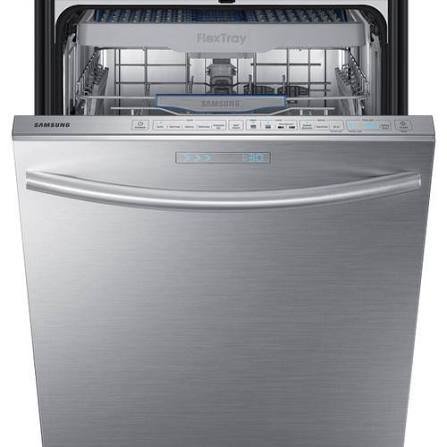

You’ve just finished loading the dishwasher after a big Texas barbecue, hit start, and come back to a tub full of dirty, standing water. Or worse—your Samsung is flashing a 5E, 5C, SC, or SE error code and refuses to finish the cycle. Sound familiar? You’re not alone. Here in San Antonio, I see this exact scenario on dishwashers almost every week.

I’m Master Tech Scott with HomeWise Services, a Samsung Certified technician who’s spent years fixing appliances across the city—from Stone Oak to the Southside, Alamo Heights to the West Side. I’ve handled hundreds of JustAnswer consultations and local service calls on Samsung, LG, Whirlpool, GE, and Maytag units. Today I’m walking you through the real causes of a Samsung dishwasher not draining, step-by-step DIY fixes that actually work, maintenance that prevents the next failure, and clear signs it’s time to call a pro for appliance repair near me San Antonio.
Common Reasons Your Samsung Dishwasher Isn’t Draining (Especially in San Antonio)
Samsung dishwashers are solid machines, but they’re sensitive to a few local realities. Our hard water from the Edwards Aquifer (often 15–20 grains) combines with food grease and soap scum faster than in softer-water areas. That buildup loves to clog filters and restrict drain paths.
Here are the top culprits I diagnose on service calls:
- Clogged filter and sump screen — The #1 issue. Food particles, coffee grounds, and mineral scale block water from reaching the drain pump.
- Kinked, pinched, or clogged drain hose — Especially common after installation or when the dishwasher sits on its own hose.
- Garbage disposal or sink drain blockage — If the disposal is full or the knockout plug was never removed, water has nowhere to go.
- Failed or jammed drain pump — The pump can burn out or get jammed with debris after years of hard-water duty.
- Air gap or high-loop problems — Required for proper drainage; clogs or missing loops trigger drain errors.
- Error codes pointing to the issue — 5E/5C/SE/SC = drain error. LC/LE = leak detection (often secondary to overflow from poor draining). 4C/4E = water supply issues that can cascade into drainage problems.
Other brands like Whirlpool and GE show similar symptoms, but Samsung’s dual-pump design and sensitive sensors make the codes more precise—and the fixes more straightforward once you know where to look.
Step-by-Step Troubleshooting & DIY Fixes for Samsung Dishwasher Not Draining
Safety first: Turn off power at the breaker and shut off the water supply valve under the sink before you start. Never stick your hand in while the unit is powered.
- Clean the filter assembly (do this first—it fixes half the cases I see)
Remove the bottom rack. Twist the cylindrical coarse filter counterclockwise and lift it out. Pull the fine mesh screen underneath. Rinse both under hot water and scrub with a soft brush or old toothbrush. Clear any debris from the sump area at the bottom of the tub. Reinstall firmly. Run a short rinse cycle to test. - Check the drain hose and high loop
Pull the dishwasher out carefully (or look under the sink). Make sure the drain hose isn’t kinked, crushed under the unit, or looped too low. It should have a high loop or connect to an air gap above the drain connection. Disconnect the hose at the sink/disposal end and flush it with water or use a long brush to clear gunk. - Clear the garbage disposal and sink drain
Run the disposal with cold water for 30 seconds. Check that the dishwasher drain connection on the disposal has the knockout plug removed (common after new installs). Fill the sink and verify it drains freely. If the sink is slow, the house plumbing may be the real problem. - Force a drain cycle
On most Samsung models, press and hold the Start button for 3 seconds to cancel and force a drain. Listen for the pump running. If it hums but water doesn’t move, the impeller is likely jammed or the pump is failing. - Inspect for obvious leaks or float issues
Look under the unit for water in the base pan (this triggers LC/LE codes). Dry it thoroughly. Check that the float switch moves freely.
Bold tip: In San Antonio hard-water homes, clean the filter every 2–4 weeks and run a dishwasher cleaner cycle monthly with a citric-acid based product. It dramatically reduces mineral scale that accelerates clogs.
If these steps clear the standing water and the error code disappears, great—you just saved a service call. If the 5E/5C returns or the pump is silent/humming without draining, stop here.
Maintenance Tips to Keep Your Samsung Dishwasher Draining Reliably
Prevention is cheaper than repair. Here’s what I recommend to every San Antonio homeowner:
- Clean the filter and spray arms monthly.
- Scrape (don’t rinse) dishes before loading—excess food is the enemy.
- Use the right amount of dishwasher detergent (not regular dish soap) and keep rinse aid filled.
- Run hot water at the sink before starting a cycle so the unit fills with proper temperature water.
- Check the drain hose and high loop twice a year.
- Consider a whole-house water softener or at least a filter if your hardness is high—your appliances will thank you.
These habits also help LG, Whirlpool, and GE units that suffer the same hard-water and debris issues.
When to Call a Professional for Samsung Repair San Antonio
Call a pro when:
- The filter and hose are clear but water still stands or the 5E/5C code returns.
- You hear the pump hum but nothing drains (failed pump or jammed impeller).
- LC/LE leak codes appear with actual water under the unit.
- The unit is less than a few years old and still under manufacturer warranty (or you have extended coverage).
- You’re not comfortable pulling the unit or working with electrical/water connections.
Red flags that mean stop DIY immediately: burning smells, visible electrical damage, water leaking onto the floor, or repeated overflow. These can damage cabinets and flooring fast in our humid climate.
Real Local Case Study
Last month I got a call from a homeowner in the Medical Center area. Their three-year-old Samsung was throwing 5E codes and leaving two inches of dirty water. They’d already cleaned the filter twice. When I arrived, the drain hose had a sharp kink where it ran behind the unit, and the air gap was half-clogged with grease. Fifteen minutes of hose repositioning, air-gap cleaning, and a pump check later, it drained perfectly. Hard-water scale on the filter had started the problem; the kink finished it. Simple fix, big relief.
I’ve seen the same pattern on JustAnswer chats from San Antonio and surrounding areas—homeowners trying the filter first (smart), then getting stuck when the hose or pump is the real culprit.
Peace of Mind with Liberty Home Guard
Unexpected appliance failures are stressful and expensive. That’s why I recommend Liberty Home Guard to many of my customers. As their preferred local service provider in the San Antonio area, HomeWise Services handles claims quickly and professionally. A solid home warranty transfers the risk so a failed drain pump or control board doesn’t wreck your budget. If you already have coverage, mention it when you book—we work seamlessly with them.
Ready to Get Your Dishwasher Working Again?
Don’t let standing water and error codes ruin your kitchen routine. Try the DIY steps above first. If you need expert hands, book Samsung repair San Antonio (or any major brand) with HomeWise Services today:
https://homewise-services-100453.square.site
You can also reach me for quick advice through my JustAnswer profile. Drop a comment below with your model number and the exact error code or symptom—I read them and reply when I can. What other appliance headaches are you dealing with right now?
And remember—HomeWise Services isn’t just appliance repair. We also handle plumbing, irrigation systems, epoxy coatings, and more to keep your whole home running strong.
Master Tech Scott | HomeWise Services – San Antonio’s Trusted Appliance Repair Expert
Leave a Reply